

Erinnyes
Administrator
- Joined
- Jul 8, 2025
- Messages
- 58
- Thread Author
- #1
 Fixes & Changes
Fixes & Changes- Flying state synchronization between the client and server has been improved, reducing desync issues when taking off, moving through the air, and landing.
- The TMQ spaceship takeoff cinematic now plays correctly when the player is mounted on a vehicle.
- The Vehicle interface will no longer attempt to automatically equip expired fuel.
- Guard and RP Charge auras now remain displayed correctly when another player enters your world cell.
- Players will no longer receive the burn debuff when dashing over lava.
- The option to request Zeni through the in-game mail system has been disabled.
- "Already known" label has been added on info window when hovering on a recipe and player already knows it (credits to Shimau)
 Notice
Due to recent core improvements to GUI positioning, some interface windows may appear missing or incorrectly placed. To restore all windows to their default positions, go to:Options → Game → Other → Default Windows Position
 HoiPoi Weapon Skin Fusion System
Make your own unique Weapon with the new HoiPoi Weapon Skin Fusion by mixing Legendary weapons — then sell it on the Auction House, trade it, or just wear it. HoiPoi Weapon Skin Fusion System New
New- HoiPoi Weapon Skin Fusion option: Added a new “Weapon Skin Fusion” interaction to the HoiPoi Machine.
- New crafting GUI: Implemented a dedicated UI for selecting weabon and crafting your custom Weapon.
- Updated crafted icons: Created weapon icons now include a green “C” marker.
 Requirements
- All 3 pieces must be Legendary
- All items must be for the same type.
- Necessary material required which you can find in shard shop.
 Chat Rework
The chat system has received several improvements, introducing better item interaction, player mentions, and emoji support. Chat Rework
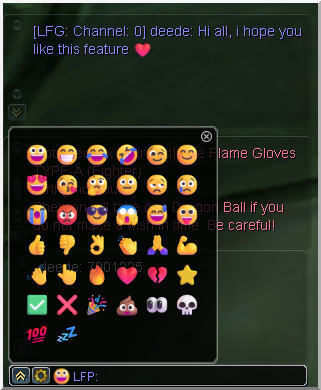
 Emojis
- A dedicated emoji selection window has been added, allowing players to browse and choose emojis.
- The emoji window can be opened through the smiley-face button located next to the chat input field.
- Selected emojis will appear both in the chat window and inside the speech bubble above the character.
- Common text shortcuts such as : ), : - ), :-D, and : D will automatically be converted into their corresponding emojis.
 Sender Hovering
- When hovering over a linked item in chat, the sender’s name will now be underlined, making it easier to identify who shared it.
 Player Mentions
- Players can now mention another player by typing @ followed by their character name.
- The mentioned player will receive an on-screen notification.
- Their name will also be highlighted within the chat message, making mentions easier to notice.
 Item Reference
- Equippable items can now be shared directly in chat by using Shift + Right-Click on the item.
- Other players can hover over the referenced item name to view its complete details and equipment information.
(Credits to Shimau)
 Dragon Ball Online Wiki Updated
Dragon Ball Online Wiki Updated- New Theme
- Contains now Quests Section